About#
Cisco Unified Border Element (CUBE) exposes a powerful SIP Profiles command set. Administrators can modify, add, remove, or copy elements of SIP headers or SDP bodies on requests or responses. Typical uses include adding a header required by a peer, removing a problematic header as a workaround, or changing values that are not exposed elsewhere in the CLI.
Because the number of possible rules and regex combinations is large, validating that a profile does what you intend—before it touches live traffic—is essential.
The SIP Profile Tester (SPT) is a feature of Collaboration Solution Analyzer (CSA). It lets you simulate SIP Profile rule logic on real SIP messages offline. You can inspect outputs, iterate on regex and rule wording, and gain confidence that a change will not cause an outage, without modifying production traffic or depending on a full lab reproduction for every tweak.
For general regex practice (pattern and replacement behavior), tools such as regex101 are useful; the Cisco SIP Profile syntax still must follow CUBE documentation.
Key features#
Offline simulation — Apply profile rules to pasted SIP messages; no impact on production.
Side-by-side results — Original message, modified message, copy registers (for copy rules), structured logs (action, before, after, rule), and a dedicated errors section.
Visual diff-style highlighting — Modified headers/SDP highlighted in blue (both panes); additions in green (modified pane only); removals in red (original pane only).
Prebuilt Templates — Dropdown samples for common rules (add/remove/modify headers, copy from message or peer, CSEQ-based behavior, mline-index, and more) and for representative SIP requests/responses (various headers and SDP: audio, video, app, mime, T.38).
SDP awareness — When the SDP body changes,
Content-Lengthis adjusted; an INFO-level log describes this (the header change may not be highlighted like body edits).
Entering rules and messages#
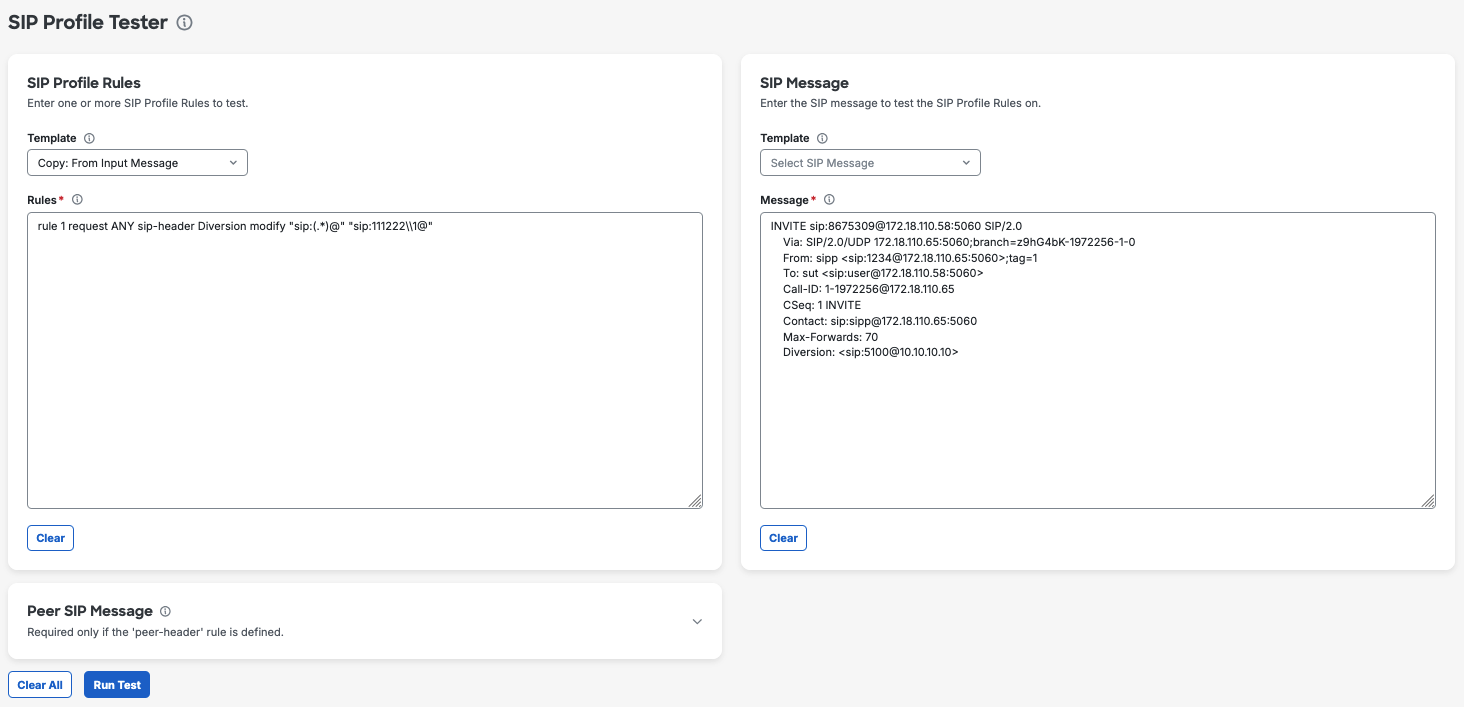
SIP Profile Rules
Paste one or more rule statements you want to test.
Optionally use the template to load a prebuilt rule set (add/remove/modify/copy/advanced/specific). Use these to learn patterns or as a starting point for custom rules.
SIP Message To Test Rules On
Paste the full SIP message (headers and body as required).
Optionally use the template to load a sample request or response with representative headers and SDP.
Peer SIP Message To Copy From (only if needed)
Leave empty if your rules do not reference peer copy behavior.
If your rules use peer keywords (e.g.
peer-headeror copylist from the other leg), paste the peer message here. The UI treats this field as required whenpeerappears in the rules.
More information about the tool might be found here: CSA SIP Profile Tester (Cisco Community)